Introduction
Native advertising crossed $108.83 billion in US spend in 2024, according to EMARKETER — and that growth isn't slowing. The format works because it fits where readers already are, inside content feeds and publisher pages, rather than interrupting them with a banner they've been trained to ignore.
Self-serve platforms like Taboola, Outbrain, MGID, and Sharethrough have made native advertising accessible to brands without agency relationships or managed service budgets. The setup process is genuinely straightforward. The hard part is what comes after:
- Choosing the right creative approach for your audience
- Matching your ad to the right content environment
- Building a testing budget large enough to generate real data
This guide covers what you need before you launch, the exact steps to create and publish a native campaign, the performance variables that matter most, and the mistakes that drain budgets without producing insight.
Key Takeaways
- Self-serve native platforms let any advertiser create, target, and launch campaigns without an agency
- Core inputs: campaign objective, editorial-style creative (headline + image), audience targeting, and bidding model
- Performance hinges on creative-to-context fit, landing page quality, and adequate budget for algorithm learning
- Common mistakes: repurposing display creative, under-funding campaigns, and ignoring publisher-level performance data
- Best suited for brands with content-driven storytelling and mid-funnel audiences at scale
What You Need Before Creating Native Ads on a Self-Serve Platform
Getting the setup right before you launch matters more than most advertisers expect. Weak inputs — poor creative, a mismatched landing page, an underfunded account, or a misaligned offer — produce data that looks like the format doesn't work, when the real problem is the setup.
Platform and Account Requirements
Each major platform has different entry requirements:
| Platform | Minimum Deposit | Key Restrictions |
|---|---|---|
| Taboola | No stated minimum; $100 billing increments | Alcohol, CBD, crypto require pre-approval or country restrictions |
| Outbrain | $20/day ($600/month minimum) | Crypto, tobacco, Forex/CFDs limited to managed accounts |
| MGID | $100 minimum; $650 recommended | All ads pass moderation; ads in moderation cannot be edited |
| Sharethrough | Not publicly stated | Review Demand Policy before submitting |
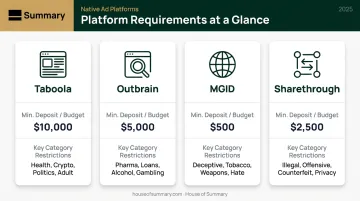
Verify that your industry and content type are accepted before building creative. Regulated categories — finance, health, crypto — face stricter review on every platform.
Creative and Landing Page Readiness
Gather these assets before opening a campaign:
- Headline: 60 characters max on Taboola, 60 recommended on Outbrain, 90 recommended on Sharethrough — build separate templates per platform
- Thumbnail image: 1200x674px on Taboola, 1200x800px on Outbrain, approximately 1200x627px on Sharethrough
- Destination URL: A landing page that matches the tone and promise of the ad
Native clicks are curiosity-driven, not high-intent. A landing page that opens with a hard sales pitch kills conversion rates: the page needs to continue the editorial feel of the ad before transitioning to any conversion mechanism.
Compliance and Disclosure
The FTC requires native ads to be clearly labeled. Acceptable terms include Ad, Advertisement, Paid Advertisement, and Sponsored Advertising Content. The FTC warns that "Promoted" alone can be ambiguous, as readers may interpret it as editorial endorsement rather than paid placement.
Platforms handle disclosure labeling automatically, but advertisers in regulated industries verify content policies before investing time in creative development.
How to Create Native Ads Using Self-Serve Platforms
Step 1: Choose Your Platform and Set Up Your Account
Platform selection should follow campaign goal, not familiarity:
- Large reach, awareness-focused: Taboola or Outbrain (broader publisher networks)
- Performance-focused or niche: MGID (CPA optimization tools, transparent minimums)
- Programmatic or exchange-based: Sharethrough (more DSP-oriented)
Account setup typically involves registering a business account, verifying payment, selecting a campaign type, and accepting the platform's content policy. Complete this before building creative — a few platforms restrict what you can edit once an ad enters moderation (MGID explicitly prohibits edits during review).
Step 2: Define Your Campaign Objective and Audience Targeting
Most platforms ask for an objective upfront (clicks, impressions, or conversions) and this determines how delivery is optimized. Choose based on what you can actually measure.
For targeting, the research is clear: start broad. Taboola's own documentation recommends the widest possible audience or blank targeting for new campaigns, noting that layering too many restrictions raises CPC and limits reach. MGID similarly advises that broad settings help AI learning. Over-targeting at launch creates a small, expensive audience the algorithm can't work with.
Available targeting options across most platforms:
- Geography (country, region, city, postal code)
- Device type (desktop, smartphone, tablet)
- Interest categories and behavioral segments
- Contextual targeting by content topic or keyword
- First-party pixel audiences and CRM lookalikes (Taboola, MGID)
Step 3: Build Your Native Ad Creative
Native creative must read like editorial content, not advertising. Headlines should spark curiosity or deliver a clear benefit — not open with a brand name or a promotional claim. Once your targeting is set, your creative does the heavy lifting.
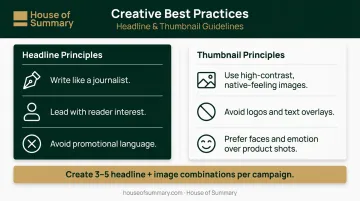
Headline principles:
- Write like a journalist, not a copywriter
- Lead with the reader's interest, not the brand's offer
- Avoid exclamation marks, ALL CAPS, or phrases like "Click here" or "Buy now"
Thumbnail principles:
- Use high-contrast images that feel native to the publisher's content environment
- Avoid obvious stock photos, logos embedded in the image, or text overlays
- Faces and emotion tend to outperform product-only shots in content discovery contexts
Create 3–5 headline and image combinations per campaign. Platforms rotate creatives and will surface the better-performing combinations — but only if you give them options to test.
Step 4: Set Your Budget, Bidding Model, and Schedule
The main pricing models and their best use cases:
| Model | Best For |
|---|---|
| CPC (cost per click) | Traffic campaigns, early testing |
| CPM (cost per thousand impressions) | Awareness, brand reach |
| CPA/Target CPA | Conversion campaigns with enough historical data |
On minimum viable test budgets: MGID recommends a $650 starting deposit to generate enough data for their CPA optimization tools to function. Outbrain recommends at least $250/day for the algorithm to explore delivery effectively. Campaigns paused too early produce no data worth acting on.
Set a daily budget rather than a lifetime budget during testing. Even pacing gives you cleaner data than accelerated spend until you know which hours drive conversions. Scheduling adjustments can come later, once you have baseline data.
Step 5: Launch, Monitor, and Optimize
With budget and schedule locked, your job shifts to monitoring. In the first 24–48 hours, check:
- Is the campaign serving? (Not stuck in review)
- Is spend pacing at the expected daily rate?
- Are CTRs within a reasonable range across creatives?
After 7–14 days, the key optimization levers are:
- Pause underperforming creatives and let the top performers take more delivery
- Adjust bids at the publisher level — Taboola's SmartBid allows site-level boosts up to 200% or cuts to -99%; Outbrain recommends "Bid by Section" rather than pausing top-spending placements
- Tighten audience segments based on which are generating qualified traffic, not just clicks
Don't make major changes before one to two weeks of data. Native campaigns need volume before patterns emerge.
Key Variables That Affect Native Ad Performance
Even well-structured campaigns underperform when these variables are miscalibrated. Platforms give you the data to diagnose each one.
Creative-to-Context Match
Native ads perform when they belong on the page. An ad with a sensational headline running alongside calm financial news content creates friction — readers notice the mismatch and don't click.
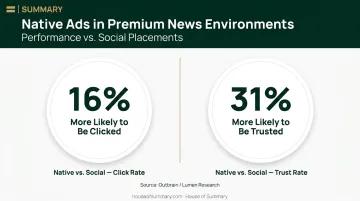
Research by Outbrain and Lumen found that native ads in premium news environments were 16% more likely to be clicked and 31% more likely to be trusted than comparable social placements. Low-CTR creatives are also deprioritized by most platform delivery algorithms, meaning a creative-context mismatch doesn't just hurt clicks — it reduces how often your ad is shown.
Landing Page Speed
Native clicks are earned by curiosity. If the landing page loads slowly, that curiosity turns into a bounce before the page renders.
Google/SOASTA research found that bounce probability increases 123% when mobile load time goes from 1 second to 10 seconds. A separate Deloitte study found that a 0.1-second improvement in mobile load speed increased retail conversion rates by 8.4% and travel conversions by 10.1%.
Test your landing page speed before scaling spend. Tools like Google PageSpeed Insights will identify exactly what's slowing the page down.
Bidding Level and Publisher-Level Controls
Bid too low and your ads won't win placements on quality publisher pages. Without data to guide higher bids, you end up paying for placements that generate clicks but no conversions.
The most effective approach after launch: use publisher-level bid controls to concentrate spend on your best-performing sources. Both Taboola and Outbrain support site-level bid adjustments — use them to:
- Increase bids on placements that drive downstream conversions
- Pull back spend on sources generating clicks with no follow-through
- Build a shortlist of high-performing publishers to prioritize at scale
Common Mistakes When Creating Native Ads on Self-Serve Platforms
Most self-serve native campaigns underperform for the same handful of reasons. Here's what to watch for before you spend a dollar.
Using Display Ad Creative for Native Placements
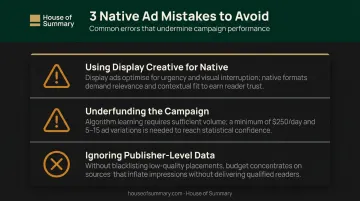
This is the most frequent mistake. Banner ad headlines ("Get 50% Off Today!"), logo-heavy thumbnails, and CTA-forward copy perform poorly in native environments. Native creative earns the click through relevance and curiosity — not urgency.
Setting Budgets Too Low to Generate Learning Data
A campaign that exhausts its budget after 200 clicks has produced no usable signal. The platform's delivery algorithm needs volume — hundreds to thousands of clicks — before it can optimize toward the right placements and audiences. Outbrain recommends a minimum of $250/day and 5–15 ad variations per campaign.
Ignoring Publisher-Level Performance Data
Every major self-serve platform provides a breakdown by publisher or placement site. Failing to review this data means budget keeps flowing to placements generating low-quality clicks. Check publisher reports after the first week. Blacklist or reduce bids on sites that consistently produce high CTR but zero conversions.
Skipping the Landing Page Audit
Native traffic is not search traffic. Users who click aren't actively in-market — they clicked because the headline caught their attention. A landing page built for high-intent search visitors will feel jarring and sales-heavy to a native audience. The page should extend the editorial feel of the ad before presenting any conversion mechanism.
When Self-Serve Native Advertising Makes Sense (and When It Doesn't)
Self-serve native platforms offer scale and cost efficiency — but they're not the right fit for every campaign or audience.
Where self-serve native works well:
- Brands with content-driven storytelling and mid-funnel audiences
- General-interest or broad-demographic targeting at meaningful scale
- Teams capable of monitoring and iterating on creative weekly
- Products or services that benefit from discovery-style exposure
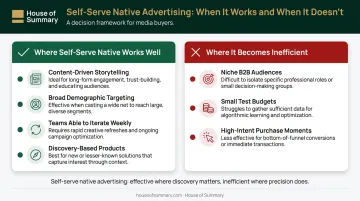
Where it becomes inefficient:
- Very niche B2B audiences (specific industries, job titles, or company sizes) that content discovery networks can't reliably reach
- Campaigns with test budgets too small to generate learning data
- Products requiring high commercial intent at the point of click — search ads typically outperform native here
For brands targeting high-intent professional audiences in finance, business, or global news, newsletter-based native advertising is a strong complement to self-serve display. Platforms like House of Summary deliver sponsored content directly to opted-in subscribers across Presidential Summary, Geopolitical Summary, Dubai Summary, and London Summary — over 500,000 readers with no ad blockers and no algorithm standing between the brand and the inbox.
The difference in results can be significant. BSH Hausgeräte achieved click-through rates 4x higher than Google AdWords from a Dubai Summary placement, driven by reaching a focused, self-selected professional audience rather than a broad content discovery network.
The two approaches serve different goals. Self-serve platforms cover scale across open web publisher networks; newsletter placements capture attention from subscribers who actively chose to be there — a distinction that shows up in engagement metrics.
Frequently Asked Questions
What is self-serve advertising?
Self-serve advertising is a model where advertisers set up, manage, and optimize their own campaigns directly through a platform dashboard, without needing an account manager or agency. You control creative, targeting, budget, and bidding through the platform's UI.
What is the difference between DSP and SSP advertising?
A DSP (Demand-Side Platform) is used by advertisers to buy ad inventory programmatically across multiple sources. An SSP (Supply-Side Platform) is used by publishers to sell their available inventory. Native ad networks like Taboola and Outbrain operate their own closed inventory ecosystems, distinct from open programmatic DSP/SSP exchanges.
How much budget do I need to start with a self-serve native ad platform?
Minimums vary: MGID requires a $100 deposit and recommends $650 to unlock CPA optimization tools; Outbrain sets a $20/day ($600/month) minimum. In practice, you need enough budget to generate hundreds of clicks before drawing conclusions about creative or targeting performance.
How do I write headlines for native ads that actually get clicked?
Effective native headlines are curiosity-driven and editorial in tone, reading like an article your target audience would genuinely want to click. Avoid brand names, promotional language, and urgency-based copy.
What metrics should I track to evaluate a native ad campaign?
Track CTR, conversion rate, CPA or CPL, and publisher-level placement data. Avoid optimizing on CTR alone. A placement with strong clicks but zero conversions is costing you budget, not earning results.
Can I run native ads without a marketing agency or large team?
Yes — self-serve platforms are designed for independent management. Successful solo campaigns require consistent monitoring, willingness to test and replace creative regularly, and enough starting budget to generate data the platform's algorithm can learn from.