Standard banner campaigns, retargeting pixels, and social ads don't just underperform with developers — they often backfire, signaling that a brand doesn't understand its audience. The format is the message, and intrusive formats send the wrong one.
Native advertising changes that equation. When executed well, it reaches developers where they already are, in a format that matches their environment rather than disrupting it.
This article covers what native advertising actually is, where developers spend their time online, how to write creative that resonates, and how to measure whether any of it is working.
Key Takeaways
- Developers block, ignore, and resent traditional ads at unusually high rates
- Native ads match their editorial environment — less friction, less resistance
- Channel selection matters as much as creative — documentation sites, technical newsletters, and developer ad networks are the right starting points
- Match your message to funnel stage: awareness, education, or conversion — each needs a different approach
- Newsletter placements bypass ad blockers entirely and land in focused, distraction-free reading sessions
Why Traditional Advertising Fails with Developers
Standard digital advertising fails with developers for structural reasons, not budget ones.
Developers are analytically trained to identify patterns, and display advertising follows extremely predictable ones: right-rail banners, pre-roll interruptions, retargeting ads that follow them across sites. Nielsen Norman Group eye-tracking research found that a right-rail area representing 25% of a page received only 0.8% of visual fixations — developers, who spend their days reading documentation and code, have this avoidance behavior dialed in sharper than most.
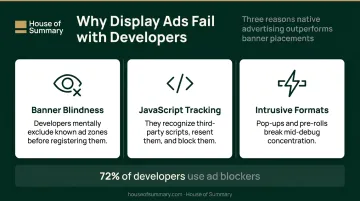
Three specific mechanisms make standard digital ads fail with this audience:
- Banner blindness — Developers know precisely where ads appear on a page and mentally exclude those zones before they even register
- JavaScript-based tracking — They recognize third-party tracking scripts, resent them, and often block them outright
- Intrusive formats — Pre-rolls and pop-ups interrupt workflow, which is the worst possible interruption for someone mid-debug
The general ad block adoption rate across the web sits at 21% of pageviews, according to the 2022 PageFair/Blockthrough Adblock Report. Among technically literate users — the people actively building with the web — that number climbs considerably higher.
Spending more on the same delivery mechanisms only deepens the waste. Reaching developers requires a different format entirely — one that earns attention rather than interrupting it.
What Native Advertising Is and Why It Works for Developers
Native advertising refers to paid placements designed to match the look, feel, and editorial context of the media they appear in. The goal is relevance over interruption: ads that read like useful recommendations rather than sales pitches inserted into someone's browsing session.
This isn't a new concept. Advertorials in print media, sponsored radio segments, and branded editorial content all operate on the same principle: when the format respects the reader's context, the message lands better.
Digital native advertising evolved this into in-feed placements, sponsored content within editorial publications, newsletter sponsorships, and contextual placements inside developer tools and documentation environments.
Why Developers Respond Differently to Native
For developers specifically, the native format addresses the core failures of display advertising:
- It doesn't interrupt workflow
- It respects the content environment where they're already focused
- When the message addresses a genuine pain point, it reads as a relevant suggestion — not an intrusion
The authenticity of the underlying message is the critical variable. Native advertising earns attention by matching context. If the product doesn't actually solve a problem the developer cares about, no format will compensate.
The Ad Blocker Advantage
Because native ads are embedded into editorial content rather than loaded through third-party JavaScript tags, they are far less susceptible to ad blockers. This is a meaningful structural advantage: a significant share of developer-audience impressions that would never render as display ads will reach readers through native placements.
Newsletter-based native placements go even further. Email delivery happens outside the browser environment entirely, which means browser extensions can't touch them. The ad arrives as part of the content the reader subscribed to receive.
On disclosure, FTC guidelines are straightforward:
- Label native ads clearly using "Sponsored," "Ad," or "Paid Advertisement"
- Avoid "Promoted" alone — it may be considered ambiguous
- Proper disclosure doesn't undermine performance; when the content is genuinely relevant, readers don't reject it because it's labeled
Where Developers Spend Their Time Online
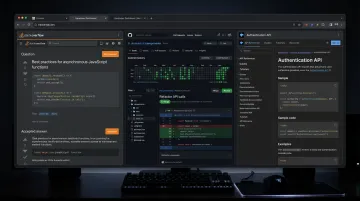
You can't place a native ad in the right environment if you don't know where developers actually are. The primary habitats:
- Stack Overflow — The 2025 Stack Overflow Developer Survey reports 82% of developers visit the platform at least a few times per month, with 25% visiting daily
- GitHub — 180M+ developers and 630M+ repositories; a core part of daily professional workflow
- MDN Web Docs — 15M+ monthly users across documentation for web technologies
- CodePen — Front-end developer community with newsletter and site sponsorship inventory
- Programming subreddits — High volume, but audience quality and signal-to-noise ratio vary widely
- Technical podcasts and newsletters — Curated, focused, and consumed during receptive moments
Developer Ad Networks
Networks like Carbon Ads aggregate premium developer-focused publisher inventory into a single buy. Carbon reports delivering 100M+ monthly impressions across open source, web development, and design websites. When evaluating a network like this, ask:
- Does the audience overlap with your specific developer persona (frontend, DevOps, mobile, etc.)?
- Are placements contextually relevant to what the developer is doing on that page?
- What's the publisher vetting process?
Carbon's case studies offer some useful directional data: Rollbar achieved a 2.4x increase in clicks and CircleCI saw a 65% decrease in cost per lead using native developer ad placements.
Newsletter Placements: The Underrated Channel
Developer newsletter sponsorships deserve more attention than they typically get. Developers who read focused technical newsletters are in a focused, receptive state — no algorithm is interrupting the experience, no sidebar ads are competing for attention.
Newsletter placements land in the inbox, outside the browser, which means ad blockers can't reach them. They also support longer-form copy, which matters for developer audiences who need to understand what a product actually does before they'll click.
The same logic applies beyond developer-specific publications. Publishers like House of Summary operate on this principle across their newsletter network: ads arrive as part of the reading experience rather than layered on top of it. For advertisers selling developer tools to engineering leaders and technology executives, inbox placements consistently deliver click-through rates that standard display formats can't match.
Why Placement Context Affects Brand Credibility
An ad on a documentation site for a DevOps tool carries credibility that the same creative on a generic news aggregator simply doesn't. Developers notice when placements feel out of place. Misaligned context damages brand perception — regardless of how good the creative is.
Before committing to any publisher or network, verify that the publication's content and editorial tone genuinely match the developer persona you're targeting. Request audience demographic data. Look for editorial standards that signal quality — low-cost inventory in developer spaces almost always reflects a low-quality audience, and you'll see that in your conversion data.
How to Craft Native Ad Creative That Resonates with Developers
Start with Specificity
Before writing a single word of copy, define exactly who you're targeting. A frontend developer building React components, a DevOps engineer managing Kubernetes clusters, and an enterprise architect evaluating cloud migration paths have entirely different pain points, tools, and motivations. Generic "developer" messaging signals immediately that the brand hasn't done the work.
The copy should reflect that specificity. If your tool solves a deployment bottleneck, say that directly. Name the problem, state what the product does about it, and explain why it's worth five minutes of investigation.
Write for Function
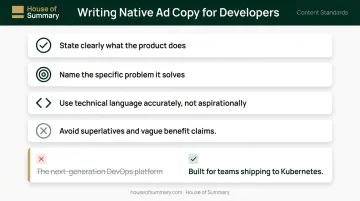
Developers respond to copy that:
- States clearly what the product does
- Names the specific problem it solves
- Uses technical language accurately (not aspirationally)
- Avoids superlatives and vague benefit claims
"Built for teams shipping to Kubernetes" outperforms "The next-generation DevOps platform" every time. Specificity tells developers you understand their work. Vague copy tells them you don't.
Match Tone to Environment
The ad should feel native linguistically, not just visually. A few quick rules:
- Documentation context: direct, utilitarian, no flourish
- Technical newsletter: slightly warmer works, but keep it grounded
- Humor: only if it shows genuine insider knowledge of the developer experience — generic tech jokes don't land
The Landing Page Problem
Getting the ad right is only half the job. Developers who click want the promise of the ad validated immediately — and vague marketing copy on the landing page will undo everything. Send them to:
- Technical documentation
- A working demo or sandbox
- A free trial with clear setup instructions
- A resource that delivers immediate, concrete value
Match the specificity of the ad to the specificity of the landing page. If the ad promises "easy Kubernetes deployment," the first thing on the landing page should prove it.
Mapping Native Ads to the Developer Funnel
Top of Funnel: Recognition Without the Hard Sell
High-traffic developer platforms (Stack Overflow, MDN, CodePen) are awareness environments. Native placements here should introduce the product's core value without demanding a click. The goal is recognition and the beginning of trust — not immediate conversion.
Track: impressions and unique reach.
As developers move from passive browsing to active research, your placements need to follow.
Mid-Funnel: Relevance and Depth
Developers who are actively evaluating solutions spend time in more specific environments — niche documentation, specialized newsletters, community forums for particular tools or stacks. Native placements here can go deeper:
- Feature specifics
- Integration ease
- Community adoption
- Real use cases from teams like theirs
Track: CTR and engagement metrics — time on site, scroll depth post-click.
Once a developer is close to deciding, the messaging can shift from education to action.
Bottom of Funnel: Conversion Focus
For developers close to a decision, targeted newsletter sponsorships or retargeted native placements can push toward trial, signup, or purchase. The messaging should be direct: here's the next step, here's what you get.
Track: conversion rate, trial signups, cost-per-acquisition.
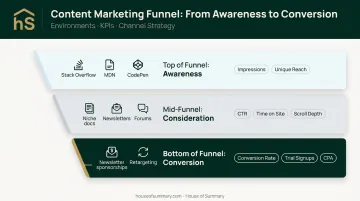
Each funnel stage demands a different approach — the table below ties it together:
| Funnel Stage | Best Environments | Primary KPIs |
|---|---|---|
| Top of Funnel | Stack Overflow, MDN, CodePen | Impressions, unique reach |
| Mid-Funnel | Niche docs, newsletters, forums | CTR, time on site, scroll depth |
| Bottom of Funnel | Newsletter sponsorships, retargeting | Conversion rate, trial signups, CPA |
Measuring Success in Developer-Focused Native Campaigns
Metrics by Funnel Stage
| Funnel Stage | Primary KPIs |
|---|---|
| Top (Awareness) | Impressions, unique reach |
| Mid (Consideration) | CTR, time-on-site post-click |
| Bottom (Conversion) | Conversion rate, trial signups, CPA |
Expect these benchmarks to differ from non-developer campaigns. Developer audiences click with higher intent — lower overall CTR but stronger post-click behavior is common. Don't benchmark against general display norms.
Diagnosing Underperformance
- Strong impressions, low CTR: The headline or value proposition isn't connecting. Test different copy angles, not just visual treatments.
- Strong CTR, low conversions: The landing page isn't delivering on the ad's promise. This is a message-match problem, not a media problem.
- Low impressions: Publisher fit or targeting is off. Reassess the placement environment.
Build in Iteration
Developer audiences respond differently across platforms, formats, and message angles. A campaign that underperforms in week one is rarely a broken channel. It usually means one variable needs adjusting. Build review cycles in from the start, hold publishers accountable for placement quality, and use early data to guide the next test rather than close the book on a channel.
Frequently Asked Questions
What is native advertising in marketing?
Native advertising refers to paid placements designed to match the look, feel, and editorial context of the surrounding content. They appear as relevant suggestions within the natural flow of a publication — clearly labeled, but built to fit rather than interrupt.
Why are developers so hard to reach with traditional advertising?
Three reasons: unusually high ad blocker adoption among technically literate users, trained banner blindness from years of building and browsing the web, and a cultural skepticism toward marketing that runs deep in most developer communities. Standard formats trigger all three simultaneously.
What channels work best for native ads targeting developers?
Developer documentation sites, technical newsletters, open-source community platforms, coding tool sites, and curated developer ad networks (like Carbon Ads) are the most effective environments. Each works because the content is genuinely connected to what developers are doing there — contextual fit drives performance.
Do native ads bypass ad blockers?
Native ads embedded directly into editorial content are far less likely to be blocked than tag-based banner ads. Newsletter-based native placements go further: email delivery happens outside the browser environment, making browser-level blocking tools entirely irrelevant.
Are newsletter placements considered native advertising?
Yes. Sponsored sections within newsletters match the editorial format of the publication, arrive without algorithmic interference, and aren't subject to browser-level ad blocking. For developers specifically, that combination is difficult to replicate through any other channel.
What KPIs should I track for native ad campaigns targeting developers?
Match KPIs to funnel stage:
- Awareness: impressions and unique reach
- Mid-funnel: CTR and post-click engagement
- Bottom-of-funnel: conversion rate and cost-per-acquisition tied to trial signups or product activations