
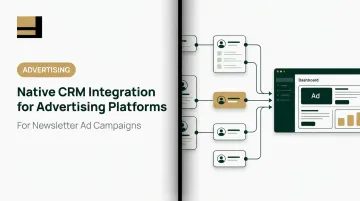
Native CRM integration is the operational bridge that closes this gap — connecting ad engagement data directly to CRM records so leads are routed, tracked, and attributed without manual intervention. But the term "integration" gets applied loosely, and the difference between a shallow one-way sync and a genuinely native connection has real consequences for how accurately you can report on campaign ROI.
According to the IAB's 2024 State of Data report, 73% of advertising decision-makers anticipate reduced ability to attribute campaign performance and measure ROI — and that problem gets worse when the ad platform and CRM aren't properly connected.
Key Takeaways
- Native CRM integration means a direct, built-in connection between the ad platform and your CRM, with no middleware or CSV exports involved
- Integration depth determines whether you get true closed-loop attribution or just surface-level contact records
- Without closed-loop data, media buyers can report clicks but not pipeline, which makes budget defense with finance teams nearly impossible
- Many platforms label shallow, one-way lead exports as "CRM integration," but the two are not the same thing
- Evaluating integration quality before committing ad spend is as important as evaluating audience reach or pricing
What Native CRM Integration Actually Means
The word "native" matters here. A native integration is built and maintained by the advertising platform itself — not a third-party connector, not a Zapier workflow, not a CSV export on a schedule. Data flows directly between the ad platform and the CRM without requiring separate tools or manual steps.
What many platforms call "integration" falls far short of this. Exporting a lead list weekly, or routing contacts through a middleware app that checks for errors once a day, is not native integration — even if the end result looks similar on the surface.
Bi-Directional Sync vs. One-Way Push
The most important distinction in integration depth is directionality:
- One-way push: The ad platform sends contact data to the CRM when a lead is captured. That's it. The platform never learns what happened next — whether the lead converted, went cold, or became a customer.
- Bi-directional sync: Data flows both ways. CRM activity — stage changes, deal updates, disposition notes — reflects back in the ad platform's reporting. Both the publisher and the advertiser get a shared view of how campaigns performed against actual revenue outcomes.
Many platforms offer one-way push while marketing it as full integration. That distinction matters: routing leads is useful, but without return data from the CRM, there's no way to optimize campaigns based on what those leads actually did.
Four Capabilities That Define Genuine Native Integration
| Capability | What It Means | Why It Matters |
|---|---|---|
| Real-time sync | Data propagates in seconds or minutes, not hours | Prevents leads from going cold before routing |
| Activity write-back | Clicks and form fills log automatically in CRM | Sales teams see full engagement history |
| Field mapping controls | Custom CRM fields (lead source, campaign name) populated correctly | Attribution reporting is accurate |
| Deduplication logic | Same lead doesn't create duplicate records | Data quality stays clean at scale |
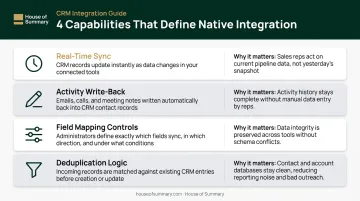
For inbox and newsletter advertising specifically, the table above has a notable gap: impression-level and open-level engagement also need to register as CRM signals. Email-based ads generate richer behavioral data than display formats, and a strong native integration surfaces that signal rather than flattening everything into a binary click/no-click record.
Why Integration Depth Matters for Attribution and ROI
When a CRM integration is shallow or broken, leads captured from campaigns exist in a separate universe from the records sales teams actually use. Marketing reports one set of numbers; sales works from another. The result is misalignment — and HubSpot's 2026 marketing data confirms it's widespread: 27% of marketers cite sales-marketing alignment as a top challenge, and 40% rank lead quality as their most important success metric.
Attribution Accuracy: From Clicks to Closed Revenue
Without closed-loop CRM integration, media buyers can report on clicks and impressions. What they can't report on is pipeline generated or deals won — which is exactly what finance teams ask about when budgets are reviewed.
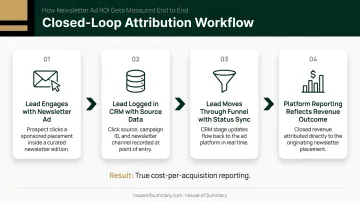
Proper attribution, when native integration is working, looks like this:
- A lead engages with a newsletter ad placement
- The lead is logged in the CRM with source data attached (campaign name, ad placement, audience segment)
- The lead moves through the funnel — status updates sync back to the ad platform
- The platform's reporting reflects the outcome, enabling accurate cost-per-acquisition calculations
That closed loop is the difference between reporting "we got 400 clicks" and proving "we generated $180,000 in pipeline at a $450 cost per qualified lead."
The Inbox Advertising Advantage for CRM Tracking
Newsletter and inbox advertising offers cleaner attribution than web display or social ads for a structural reason: there are no ad blockers interfering with tracking. With 776 million adblocking devices worldwide as of 2021, per Blockthrough's PageFair report, display ad tracking faces significant interference that inbox advertising simply doesn't encounter.
Newsletter clicks are also tied to real email addresses — not anonymous cookies or device IDs. When a reader clicks an ad in a curated newsletter, that click maps directly to an identifiable contact record in the CRM, giving sales teams immediate context for follow-up rather than an anonymous traffic event they can't act on.
That named, traceable engagement is what platforms like House of Summary are built to deliver. House of Summary operates a network of specialized newsletters reaching decision-makers and executives — and because readers self-select into publications covering geopolitics, business, and policy, they are not accidental visitors. Their clicks carry real intent signals that CRM records can actually act on.
Speed-to-Lead and Follow-Up SLAs
Integration depth directly affects how fast a lead reaches a sales rep. A Harvard Business Review study found that companies contacting online leads within one hour were nearly 7x more likely to qualify the lead as those waiting longer — yet the average response time among companies that responded was 42 hours.
Real-time sync closes that gap. Batch syncs running every two to four hours — documented behavior even for some webhook-based integrations — mean high-intent leads can go cold before anyone contacts them. That delay is a direct, measurable cost of shallow integration.
Key Capabilities to Evaluate Before Committing Ad Budget
This is a practical framework for assessing whether an advertising platform's CRM integration will actually serve your revenue operations — not just look good in a demo.
Bi-Directional Sync and Real-Time Data Flow
The minimum requirement is bi-directional sync. Real-time propagation (updates appearing in both systems within seconds or minutes) separates operational integrations from decorative ones.
Ask vendors specifically: what is your documented sync frequency? HubSpot's own lead ad sync documentation states new leads may take up to two hours to sync via webhook — useful context for evaluating any platform that routes through similar architecture.
Activity Write-Back and Engagement Logging
Activity write-back means clicks, form completions, and conversion events from ad interactions are logged automatically in the CRM as activities tied to the correct contact record. This eliminates manual data entry and gives sales teams full engagement history before first outreach.
Without write-back, sales reps start every call cold — no context on what the lead clicked, when they engaged, or which campaign brought them in.
Object Coverage and Field Mapping
Strong integrations sync more than contacts. Look for:
- Lead and contact objects (the baseline for any integration)
- Campaign objects that tie ad-sourced leads directly to campaign records for attribution
- Opportunity syncing so revenue outcomes connect back to the ad source
Field mapping flexibility matters equally. Custom CRM fields (lead source, campaign name, audience segment, newsletter placement) need to populate correctly, not map to generic text fields that break attribution reporting.
Governance, Error Alerting, and License Transparency
Enterprise-grade integrations include:
- Audit logs for data flow tracking
- Sync error notifications so failures are caught before data is corrupted
- Admin permission controls
Watch for license gating: many platforms advertise CRM integration but lock activity write-back or field mapping behind premium tiers. Confirm exactly what's included on your specific plan before signing, not what becomes available at a higher spend level.
Native vs. Third-Party Integration: The Real Trade-offs
| Factor | Native Integration | Third-Party (iPaaS/Zapier) |
|---|---|---|
| Setup complexity | Low — typically plug-and-play | Higher — requires configuration |
| Cost | Usually included in platform | Additional licensing fees |
| Flexibility | Limited to platform's CRM partners | Broad — connects most systems |
| Reliability | Vendor-supported directly | Dependent on connector uptime |
| Maintenance | Vendor-managed | Requires ongoing monitoring |
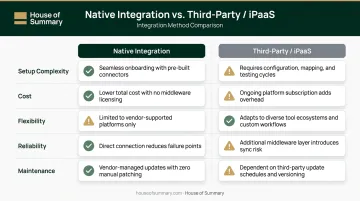
The table above maps the structural differences, but real-world usage tells a sharper story. G2 review data for Zapier shows ease of use and broad connectivity as the top cited advantages — while pricing concerns and troubleshooting complexity appear in hundreds of negative reviews. Delayed or failed automations affecting time-sensitive workflows, including lead routing, are a documented risk.
When Native Is Sufficient
Native integration meets advertiser needs when:
- The CRM setup is standard Salesforce or HubSpot without heavy custom objects
- The primary need is lead capture and source attribution, not deep pipeline synchronization
- The team doesn't need to unify data across multiple ad platforms simultaneously
That works well in straightforward setups. When campaigns and data flows grow more complex, the calculus shifts.
When Third-Party Becomes Necessary
Third-party or custom integration makes more sense when:
- Campaigns run across multiple platforms requiring a unified data layer
- The CRM involves complex custom objects or multi-system data flows
- Ad engagement data needs to connect simultaneously with ERP or marketing automation platforms
How to Evaluate an Ad Platform's Integration Before You Commit
Questions to Ask Every Vendor
- Is this integration built and maintained by your team, or is it a third-party marketplace listing?
- What is the documented sync frequency — real-time, near-real-time, or batch?
- Does the integration support bi-directional sync, or only lead export?
- Is activity write-back included in our plan tier, or is it a premium add-on?
- Can we test in a sandbox environment before going live?
- Can you provide references from other advertisers using this integration at scale?
Signals That Indicate a High-Quality Integration
Watch for these signals when a vendor demos their integration:
- The vendor can demonstrate a live sync during the sales process, not just show a slide
- Documentation exists for field mapping, error handling, and sync frequency — not just a support article that says "contact us"
- Other advertisers at similar scale are using the integration and can serve as references
- Integration issues have a dedicated support path, not just general customer service routing
There's a less obvious signal worth adding to your checklist: the quality of the traffic the platform actually delivers. Integrations built on clean, high-intent leads — such as clicks from engaged newsletter subscribers rather than anonymized display traffic — produce CRM records that are easier to work with and more predictive of downstream conversion. A technically sound integration still only moves the data you feed it. Evaluate both the plumbing and the source.

Frequently Asked Questions
What is the difference between native CRM integration and third-party integration for advertising platforms?
Native integration means the connection is built and maintained by the advertising platform itself (no middleware required). Third-party integrations use external tools like Zapier or iPaaS connectors, which add cost, introduce latency, and create additional points of failure that the ad platform doesn't control or support.
Which CRM systems do advertising platforms most commonly support natively?
Salesforce and HubSpot are the most commonly supported CRMs in advertising platform native integrations, with Microsoft Dynamics frequently included as well. Less mainstream CRMs typically require third-party connectors or custom API work.
How does native CRM integration improve ad campaign ROI measurement?
Native integration connects ad engagement data directly to CRM pipeline records, allowing advertisers to trace individual leads from first click through to closed deal. This makes it possible to calculate true cost-per-acquisition rather than relying on click-level metrics that don't reflect revenue outcomes.
What should media buyers look for in an advertising platform's CRM integration?
Five capabilities to verify before committing budget to any platform:
- Bi-directional sync
- Real-time data flow
- Activity write-back
- Object coverage (contacts, leads, campaigns, opportunities)
- License tier transparency
Can newsletter advertising platforms integrate with CRM systems natively?
Yes. Because newsletter clicks are tied to real, identifiable email addresses rather than anonymous cookies, the resulting CRM data is often more accurate and actionable than data from display or social platforms. There are no ad blockers to interfere, and the identity signal is stronger.
What risks do advertisers face when a platform lacks native CRM integration?
The operational risks include manual data entry errors, delayed lead routing, broken attribution, and inability to prove campaign ROI. Without native integration, ad-sourced leads are routinely misattributed or lost before they reach the pipeline.